> ## Documentation Index
> Fetch the complete documentation index at: https://bun.com/docs/llms.txt
> Use this file to discover all available pages before exploring further.
# Test runner
> Bun's fast, built-in, Jest-compatible test runner with TypeScript support, lifecycle hooks, mocking, and watch mode
Bun ships with a fast, built-in, Jest-compatible test runner. Tests run in the Bun runtime and support the following features.
* TypeScript and JSX
* Lifecycle hooks
* Snapshot testing
* UI & DOM testing
* Watch mode with `--watch`
* Script pre-loading with `--preload`
Bun aims for compatibility with Jest, but not everything is implemented. To track compatibility, see [this tracking
issue](https://github.com/oven-sh/bun/issues/1825).
## Run tests
```bash terminal icon="terminal" theme={"theme":{"light":"github-light","dark":"dracula"}}
bun test
```
Tests are written in JavaScript or TypeScript with a Jest-like API. See [Writing tests](/test/writing-tests).
```ts math.test.ts icon="https://mintcdn.com/bun-1dd33a4e/JUhaF6Mf68z_zHyy/icons/typescript.svg?fit=max&auto=format&n=JUhaF6Mf68z_zHyy&q=85&s=7ac549adaea8d5487d8fbd58cc3ea35b" theme={"theme":{"light":"github-light","dark":"dracula"}}
import { expect, test } from "bun:test";
test("2 + 2", () => {
expect(2 + 2).toBe(4);
});
```
The runner recursively searches the working directory for files that match the following patterns:
* `*.test.{js|jsx|ts|tsx|mjs|cjs|mts|cts}`
* `*_test.{js|jsx|ts|tsx|mjs|cjs|mts|cts}`
* `*.spec.{js|jsx|ts|tsx|mjs|cjs|mts|cts}`
* `*_spec.{js|jsx|ts|tsx|mjs|cjs|mts|cts}`
To filter the set of *test files* to run, pass additional positional arguments to `bun test`. Any test file with a path that matches one of the filters runs. Filters are commonly file or directory names; glob patterns are not yet supported.
```bash terminal icon="terminal" theme={"theme":{"light":"github-light","dark":"dracula"}}
bun test ...
```
To filter by *test name*, use the `-t`/`--test-name-pattern` flag.
```sh terminal icon="terminal" theme={"theme":{"light":"github-light","dark":"dracula"}}
# run all tests or test suites with "addition" in the name
bun test --test-name-pattern addition
```
To run a specific file in the test runner, make sure the path starts with `./` or `/` to distinguish it from a filter name.
```bash terminal icon="terminal" theme={"theme":{"light":"github-light","dark":"dracula"}}
bun test ./test/specific-file.test.ts
```
The test runner runs all tests in a single process. It loads all `--preload` scripts (see [Lifecycle](/test/lifecycle)), then runs all tests. If a test fails, the test runner exits with a non-zero exit code.
## CI/CD integration
`bun test` supports a variety of CI/CD integrations.
### GitHub Actions
`bun test` automatically detects when it's running inside GitHub Actions and emits GitHub Actions annotations to the console directly.
No configuration is needed, other than installing `bun` in the workflow and running `bun test`.
#### How to install `bun` in a GitHub Actions workflow
To use `bun test` in a GitHub Actions workflow, add the following step:
```yaml title=".github/workflows/test.yml" icon="file-code" theme={"theme":{"light":"github-light","dark":"dracula"}}
jobs:
build:
name: build-app
runs-on: ubuntu-latest
steps:
- name: Checkout
uses: actions/checkout@v4
- name: Install bun
uses: oven-sh/setup-bun@v2
- name: Install dependencies # (assuming your project has dependencies)
run: bun install # You can use npm/yarn/pnpm instead if you prefer
- name: Run tests
run: bun test
```
### JUnit XML reports (GitLab, etc.)
To write a JUnit XML report, pass `--reporter=junit` together with `--reporter-outfile`.
```sh terminal icon="terminal" theme={"theme":{"light":"github-light","dark":"dracula"}}
bun test --reporter=junit --reporter-outfile=./bun.xml
```
`bun test` still writes to stdout/stderr as usual, and writes the JUnit XML report to the given path at the end of the run.
JUnit XML is a popular format for reporting test results in CI/CD pipelines.
## Timeouts
Use the `--timeout` flag to specify a *per-test* timeout in milliseconds. If a test times out, it is marked as failed. The default value is `5000`.
```bash terminal icon="terminal" theme={"theme":{"light":"github-light","dark":"dracula"}}
# default value is 5000
bun test --timeout 20
```
## Concurrent test execution
By default, Bun runs all tests sequentially within each test file. Concurrent execution runs async tests in parallel, which speeds up test suites with independent tests.
### `--concurrent` flag
Use the `--concurrent` flag to run all tests concurrently within their respective files:
```sh terminal icon="terminal" theme={"theme":{"light":"github-light","dark":"dracula"}}
bun test --concurrent
```
When this flag is enabled, all tests run in parallel unless marked with `test.serial`.
### `--max-concurrency` flag
Control the maximum number of tests running simultaneously with the `--max-concurrency` flag:
```sh terminal icon="terminal" theme={"theme":{"light":"github-light","dark":"dracula"}}
# Limit to 4 concurrent tests
bun test --concurrent --max-concurrency 4
# Default: 20
bun test --concurrent
```
This helps prevent resource exhaustion when running many concurrent tests. The default value is 20.
### `test.concurrent`
Mark individual tests to run concurrently, even when the `--concurrent` flag is not used:
```ts title="math.test.ts" icon="https://mintcdn.com/bun-1dd33a4e/JUhaF6Mf68z_zHyy/icons/typescript.svg?fit=max&auto=format&n=JUhaF6Mf68z_zHyy&q=85&s=7ac549adaea8d5487d8fbd58cc3ea35b" theme={"theme":{"light":"github-light","dark":"dracula"}}
import { test, expect } from "bun:test";
// These tests run in parallel with each other
test.concurrent("concurrent test 1", async () => {
await fetch("/api/endpoint1");
expect(true).toBe(true);
});
test.concurrent("concurrent test 2", async () => {
await fetch("/api/endpoint2");
expect(true).toBe(true);
});
// This test runs sequentially
test("sequential test", () => {
expect(1 + 1).toBe(2);
});
```
### `test.serial`
Force tests to run sequentially, even when the `--concurrent` flag is enabled:
```ts title="math.test.ts" icon="https://mintcdn.com/bun-1dd33a4e/JUhaF6Mf68z_zHyy/icons/typescript.svg?fit=max&auto=format&n=JUhaF6Mf68z_zHyy&q=85&s=7ac549adaea8d5487d8fbd58cc3ea35b" theme={"theme":{"light":"github-light","dark":"dracula"}}
import { test, expect } from "bun:test";
let sharedState = 0;
// These tests must run in order
test.serial("first serial test", () => {
sharedState = 1;
expect(sharedState).toBe(1);
});
test.serial("second serial test", () => {
// Depends on the previous test
expect(sharedState).toBe(1);
sharedState = 2;
});
// This test can run concurrently if --concurrent is enabled
test("independent test", () => {
expect(true).toBe(true);
});
// Chaining test qualifiers
test.failing.each([1, 2, 3])("chained qualifiers %d", input => {
expect(input).toBe(0); // This test is expected to fail for each input
});
```
## Retry failed tests
Use the `--retry` flag to automatically retry failed tests up to a given number of times. If a test fails and then passes on a subsequent attempt, it is reported as passing.
```sh terminal icon="terminal" theme={"theme":{"light":"github-light","dark":"dracula"}}
bun test --retry 3
```
Per-test `{ retry: N }` overrides the global `--retry` value:
```ts theme={"theme":{"light":"github-light","dark":"dracula"}}
// Uses the global --retry value
test("uses global retry", () => {
/* ... */
});
// Overrides --retry with its own value
test("custom retry", { retry: 1 }, () => {
/* ... */
});
```
You can also set this in `bunfig.toml`:
```toml title="bunfig.toml" icon="settings" theme={"theme":{"light":"github-light","dark":"dracula"}}
[test]
retry = 3
```
## Rerun tests
Use the `--rerun-each` flag to run each test multiple times. This surfaces flaky or non-deterministic test failures.
```sh terminal icon="terminal" theme={"theme":{"light":"github-light","dark":"dracula"}}
bun test --rerun-each 100
```
## Randomize test execution order
Use the `--randomize` flag to run tests in a random order. This helps detect tests that depend on shared state or execution order.
```sh terminal icon="terminal" theme={"theme":{"light":"github-light","dark":"dracula"}}
bun test --randomize
```
With `--randomize`, the seed used for randomization is displayed in the test summary:
```sh terminal icon="terminal" theme={"theme":{"light":"github-light","dark":"dracula"}}
bun test --randomize
```
```txt theme={"theme":{"light":"github-light","dark":"dracula"}}
# ... test output ...
--seed=12345
2 pass
8 fail
Ran 10 tests across 2 files. [50.00ms]
```
### Reproducible random order with `--seed`
Use the `--seed` flag to specify the randomization seed and reproduce the same test order when debugging order-dependent failures.
```sh terminal icon="terminal" theme={"theme":{"light":"github-light","dark":"dracula"}}
# Reproduce a previous randomized run
bun test --seed 123456
```
The `--seed` flag implies `--randomize`, so you don't need to specify both. The same seed always produces the same test execution order.
## Bail out with `--bail`
Use the `--bail` flag to abort the test run after a given number of test failures. By default, Bun runs all tests and reports all failures, but in CI it can be preferable to stop early and reduce CPU usage.
```sh terminal icon="terminal" theme={"theme":{"light":"github-light","dark":"dracula"}}
# bail after 1 failure
bun test --bail
# bail after 10 failure
bun test --bail=10
```
## Watch mode
Like `bun run`, `bun test` accepts the `--watch` flag to watch for changes and re-run tests.
```bash terminal icon="terminal" theme={"theme":{"light":"github-light","dark":"dracula"}}
bun test --watch
```
## Lifecycle hooks
Bun supports the following lifecycle hooks:
| Hook | Description |
| ------------ | --------------------------- |
| `beforeAll` | Runs once before all tests. |
| `beforeEach` | Runs before each test. |
| `afterEach` | Runs after each test. |
| `afterAll` | Runs once after all tests. |
Define hooks inside test files, or in a separate file preloaded with the `--preload` flag.
```sh terminal icon="terminal" theme={"theme":{"light":"github-light","dark":"dracula"}}
bun test --preload ./setup.ts
```
See [Lifecycle](/test/lifecycle).
## Mocks
Create mock functions with the `mock` function.
```ts title="math.test.ts" icon="https://mintcdn.com/bun-1dd33a4e/JUhaF6Mf68z_zHyy/icons/typescript.svg?fit=max&auto=format&n=JUhaF6Mf68z_zHyy&q=85&s=7ac549adaea8d5487d8fbd58cc3ea35b" theme={"theme":{"light":"github-light","dark":"dracula"}}
import { test, expect, mock } from "bun:test";
const random = mock(() => Math.random());
test("random", () => {
const val = random();
expect(val).toBeGreaterThan(0);
expect(random).toHaveBeenCalled();
expect(random).toHaveBeenCalledTimes(1);
});
```
Alternatively, use `jest.fn()`; it behaves identically.
```ts title="math.test.ts" icon="https://mintcdn.com/bun-1dd33a4e/JUhaF6Mf68z_zHyy/icons/typescript.svg?fit=max&auto=format&n=JUhaF6Mf68z_zHyy&q=85&s=7ac549adaea8d5487d8fbd58cc3ea35b" theme={"theme":{"light":"github-light","dark":"dracula"}}
import { test, expect, mock } from "bun:test"; // [!code --]
import { test, expect, jest } from "bun:test"; // [!code ++]
const random = mock(() => Math.random()); // [!code --]
const random = jest.fn(() => Math.random()); // [!code ++]
```
See [Mocks](/test/mocks).
## Snapshot testing
`bun test` supports snapshot testing.
```ts title="math.test.ts" icon="https://mintcdn.com/bun-1dd33a4e/JUhaF6Mf68z_zHyy/icons/typescript.svg?fit=max&auto=format&n=JUhaF6Mf68z_zHyy&q=85&s=7ac549adaea8d5487d8fbd58cc3ea35b" theme={"theme":{"light":"github-light","dark":"dracula"}}
// example usage of toMatchSnapshot
import { test, expect } from "bun:test";
test("snapshot", () => {
expect({ a: 1 }).toMatchSnapshot();
});
```
To update snapshots, use the `--update-snapshots` flag.
```sh terminal icon="terminal" theme={"theme":{"light":"github-light","dark":"dracula"}}
bun test --update-snapshots
```
See [Snapshots](/test/snapshots).
## UI & DOM testing
Bun is compatible with popular UI testing libraries:
* [HappyDOM](https://github.com/capricorn86/happy-dom)
* [DOM Testing Library](https://testing-library.com/docs/dom-testing-library/intro/)
* [React Testing Library](https://testing-library.com/docs/react-testing-library/intro)
See [DOM testing](/test/dom).
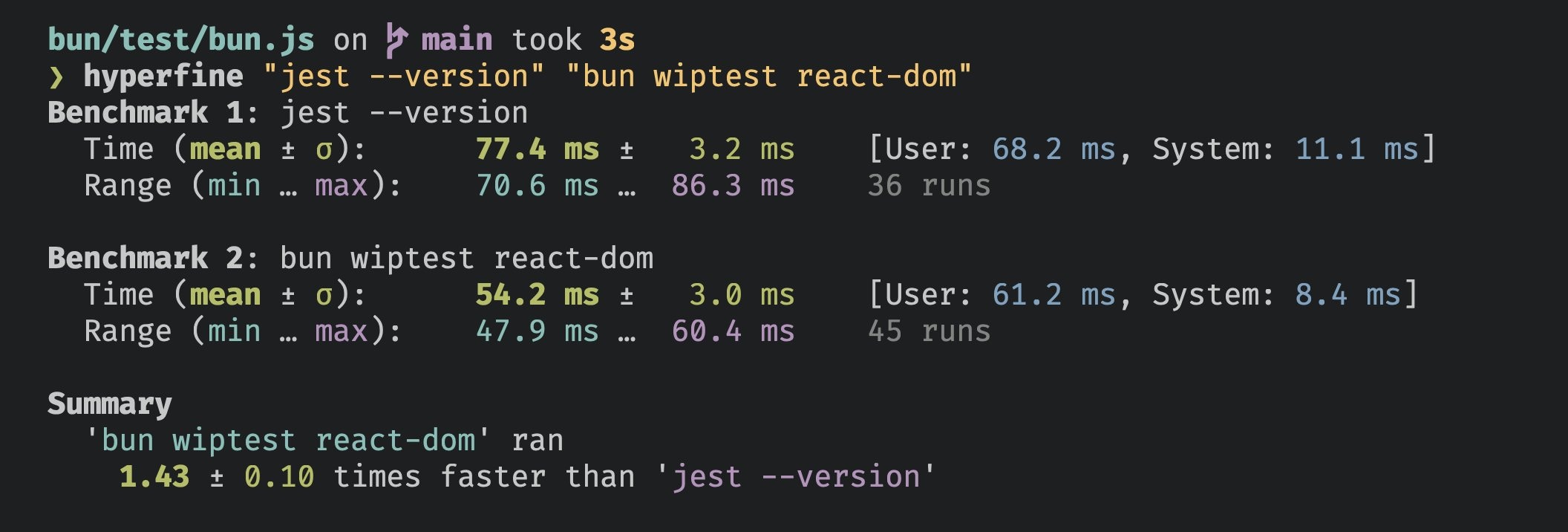
## Performance
Bun's test runner is fast.
 ## AI Agent Integration
When you use Bun's test runner with an AI coding assistant, you can enable quieter output that keeps failure details but drops the rest of the noise.
### Environment Variables
Set any of the following environment variables to enable AI-friendly output:
* `CLAUDECODE=1` - For Claude Code
* `REPL_ID=1` - For Replit
* `AGENT=1` - Generic AI agent flag
### Behavior
When an AI agent environment is detected:
* Only test failures are displayed in detail
* Passing, skipped, and todo test indicators are hidden
* Summary statistics remain intact
```bash terminal icon="terminal" theme={"theme":{"light":"github-light","dark":"dracula"}}
# Example: Enable quiet output for Claude Code
CLAUDECODE=1 bun test
# Still shows failures and summary, but hides verbose passing test output
```
***
# CLI Usage
```bash theme={"theme":{"light":"github-light","dark":"dracula"}}
bun test
```
### Execution Control
Set the per-test timeout in milliseconds (default 5000)
Re-run each test file
## AI Agent Integration
When you use Bun's test runner with an AI coding assistant, you can enable quieter output that keeps failure details but drops the rest of the noise.
### Environment Variables
Set any of the following environment variables to enable AI-friendly output:
* `CLAUDECODE=1` - For Claude Code
* `REPL_ID=1` - For Replit
* `AGENT=1` - Generic AI agent flag
### Behavior
When an AI agent environment is detected:
* Only test failures are displayed in detail
* Passing, skipped, and todo test indicators are hidden
* Summary statistics remain intact
```bash terminal icon="terminal" theme={"theme":{"light":"github-light","dark":"dracula"}}
# Example: Enable quiet output for Claude Code
CLAUDECODE=1 bun test
# Still shows failures and summary, but hides verbose passing test output
```
***
# CLI Usage
```bash theme={"theme":{"light":"github-light","dark":"dracula"}}
bun test
```
### Execution Control
Set the per-test timeout in milliseconds (default 5000)
Re-run each test file NUMBER times to help catch certain bugs
Retry failed tests up to NUMBER times. Overridden by per-test {`{ retry: N }`}
Treat all tests as test.concurrent() tests
Run tests in random order
Set the random seed for test randomization
Exit the test suite after NUMBER failures. If you do not specify a number, it defaults to 1.
Maximum number of concurrent tests to execute at once (default 20)
### Test Filtering
Include tests that are marked with test.todo()
Run only tests with a name that matches the given regex. Alias: -t
### Reporting
Test output reporter format. Available: junit (requires --reporter-outfile), dots. Default:
console output.
Output file path for the reporter format (required with --reporter)
Enable dots reporter. Shorthand for --reporter=dots
### Coverage
Generate a coverage profile
Report coverage in text and/or lcov. Defaults to text
Directory for coverage files. Defaults to coverage
### Snapshots
Update snapshot files. Alias: -u
## Examples
Run all test files:
```bash terminal icon="terminal" theme={"theme":{"light":"github-light","dark":"dracula"}}
bun test
```
Run all test files with "foo" or "bar" in the file name:
```bash terminal icon="terminal" theme={"theme":{"light":"github-light","dark":"dracula"}}
bun test foo bar
```
Run all test files, only including tests whose name includes "baz":
```bash terminal icon="terminal" theme={"theme":{"light":"github-light","dark":"dracula"}}
bun test --test-name-pattern baz
```