


Bun is an incredibly fast JavaScript runtime, bundler, transpiler, and package manager — all in one.
Bun v1.1.5 fixes 64 bugs (addressing 101 👍). bun build --compile cross-compile standalone JavaScript & TypeScript executables to other platforms. import any file as text via the type: "text" import attribute. Introduces a new crash reporter. package.json doesn't error with comments or trailing commas. Fixes a bug where bun run --filter exited with 0. Fixes a bug in bun install with file: dependencies. Fixes bugs in node:fs, node:tls, node:crypto, node:readline, node:http, node:worker_threads.
Previous releases
v1.1.4Bun v1.1.4 fixes 40 bugs (addressing 84 👍 reactions).bun run --filter <workspace> <script>lets you run multiple workspace scripts in parallel. Reinstalls get up to 50% faster in bun install. Important reliability fixes to bun install. bun:sqlite supportsusingfor resource cleanup and has a few bugfixes. Memory leak impacting Next.js Standalone & Web Streams is fixed. Node.js compatibility improvementsfsandchild_process. Fix for "Connection closed" in fetch(). A few bugfixes for Bundows.v1.1.3Bun v1.1.3 fixes 5 bugs. bun install gets 50% faster on Windows. A bug that could cause bun install to hang in rare cases has been fixed. A bug where some errors in bun install would not produce a non-zero exit code has been fixed. A bug that could cause specific certain combinations of dependencies to fail to install has been fixed. A bug on Windows where CTRL + C on cmd.exe after exiting bun would not behave as expected has been fixed. A bug where missing permissions on Windows for reading a directory could lead to a crash has been fixed.v1.1.0Bundows. Windows support is here!
To install Bun:
curl -fsSL https://bun.sh/install | bashnpm install -g bunpowershell -c "irm bun.sh/install.ps1|iex"scoop install bunbrew tap oven-sh/bunbrew install bundocker pull oven/bundocker run --rm --init --ulimit memlock=-1:-1 oven/bunTo upgrade Bun:
bun upgradeCross-compile standalone executables with bun build --compile
Standalone executables in Bun now support cross-compilation.
To cross-compile a TypeScript or JavaScript application to a different platform, use the --target option with bun build --compile:
# Linux x64
bun build --compile --target=bun-linux-x64 app.ts

# Windows x64
bun build --compile --target=bun-windows-x64 app.ts

# macOS Silicon
bun build --compile --target=bun-darwin-arm64 app.ts

# Linux arm64
bun build --compile --target=bun-linux-arm64 app.ts
bun build --compile bundles & tree-shakes your entire application (including used node_modules), plus Bun into a single executable that can be run on the target platform without dependencies.
This makes it simpler to deploy Bun to production.
- Build your app on your development machine and deploy it to a different platform without needing to install Bun on the target machine
- Build in Docker on Linux x64 and run on Linux arm64.
- Build a macOS CLI tool on a Linux machine, or a Windows CLI tool on a Macbook Pro.
- Your CI/CD pipeline can build a CLI tool for all platforms without needing to maintain multiple build machines.
package.json with comments and trailing commas
Have you ever added something in package.json and forgot why 6 months later? Or wanted to explain to teammates why we need to use a specific version of a dependency? Have you ever had a merge conflict in a package.json file due to a comma?
What JS ecosystem upgrade path would you prefer to permit comments in package.json?
— Rob Palmer (@robpalmer2) April 17, 2024
As of Bun v1.1.5, bun install, bun run <script>, bun <file>, and bun build no longer error when you use comments or trailing commas in package.json.
This package.json file will no longer error:
{
  "name": "app",
  "dependencies": {
    // We need 0.30.8 because of a bug in 0.30.9
    "drizzle-orm": "0.30.8",
  },
}
This aligns the behavior of package.json in Bun with other popular JSON configuration files like TypeScript's tsconfig.json and jsconfig.json.
We know there many other tools that read package.json. To make this easier for other tools, we've added support for require and import to load package.json files with comments and trailing commas. This works in TypeScript files, JavaScript files in bun build and at runtime.
const pkg = require("./package.json");
const {
  default: { name },
} = await import("./package.json");
For ecosystem compatibility, we don't recommend using this feature. But who knows, maybe one day it'll get standardized in the JSON spec.
bun.report is Bun's new crash reporter
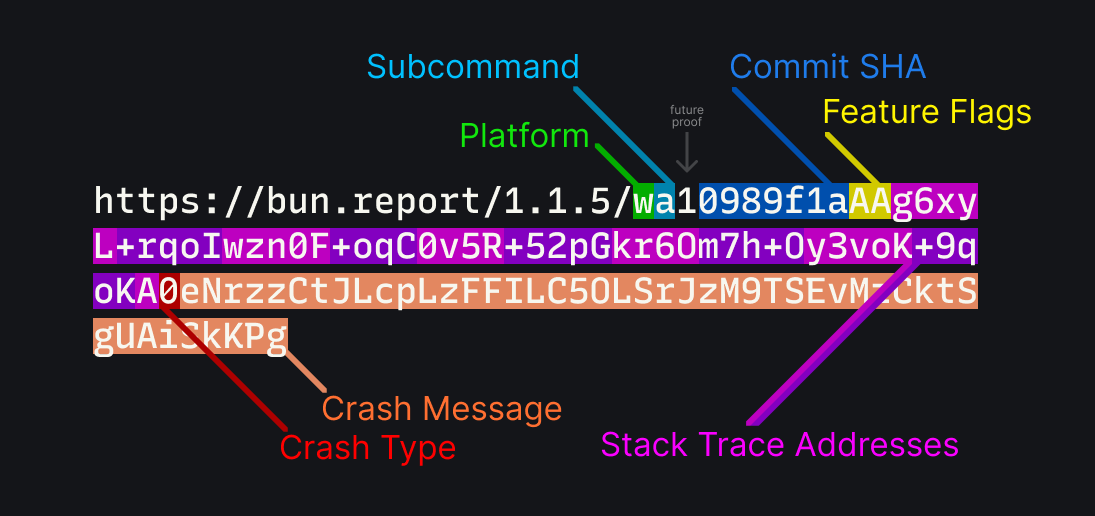
To help us debug panics and crashes, we've implemented a compact new stack trace format for Zig and C++ crash reports. The crash report fits in a ~150 byte URL.
We wrote a whole blog post on this new feature, bun.report is Bun's new crash reporter.
New: import any file as text
You can now import any file as a string using the type: "text" import attribute. This is useful when you want to import a file as a string, even if it doesn't have a .txt extension.
Like other imports in Bun, text imports support hot reloading and watch mode, so when you start Bun with --hot or --watch, Bun automatically reloads the file when it changes.
import html from "./index.html" with type { type: "text" };

console.log(html);
When used with bun build --compile, this embeds the file as a string in the executable.
Import Attributes are a TC39 stage3 proposal with implementations in multiple JavaScript engines.
toml, json, and file import attributes
We've also added support for the following import attributes:
jsontomlfile
Previously, a --loader needed to be passed to configure this behavior. Now you can use these import attributes directly.
// its a .foo file, but `type` makes it read as JSON
import json from "./config.foo" with { type: "json" };

// there's no toml extension, but `type` makes it read as toml.
import cfg from "./Configfile" with { type: "toml" };

console.log(cfg); // { "name": "app" }
console.log(json); // { "name": "app" } (converted to JSON object)
Bun.serve() now supports Server Name Indication (SNI)
You can now specify multiple serverName TLS entries in Bun.serve. This is useful when you want to serve multiple TLS certificates or hostnames on the same port.
import { serve } from "bun";

serve({
  port: 443,
  tls: [
    {
      cert: Bun.file("./example.pem"),
      key: Bun.file("./example-key.pem"),
      serverName: "*.example.com",
    },
    {
      cert: Bun.file("./test.pem"),
      key: Bun.file("./test-key.pem"),
      serverName: "*.test.com",
    },
  ],
  fetch(request) {
    return new Response("Using TLS!");
  },
});
This also fixed a bug where serverName would not work, even with a single entry. Thanks to @cirospaciari for fixing this bug.
Fixed: bun run --filter always exited with 0
In Bun v1.1.4, we introduced bun run --filter which allows you to run multiple scripts in parallel. We fixed a bug where the --filter option was not returning a non-zero exit code when one of the scripts failed.
{
  "scripts": {
    "pass": "exit 0",
    "fail": "exit 1"
  }
}
bun run --filter "*"echo $?# Before: 0
# After: 1Thanks to @gvilums for fixing this bug.
Fixed: Absolute patterns in Bun.Glob not working
There was a bug where glob patterns that contained an absolute path would not work with Bun.Glob.
import { Glob } from "bun";

const glob = new Glob("/tmp/*");
const matches = [...glob.scanSync("/tmp")];

console.log(matches.length);
// Before: 0 (incorrect)
// After: > 0 (correct)
Thanks to @zackradisic for fixing this bug.
Fixed: bun build --compile sometimes not respecting --outfile
There was a bug in bun build --compile that caused it to not respect the --outfile option when there was an external file that was being imported.
import file from "./file.png";
bun build --compile app.ts --outfile build/app# Before:./app# After:./build/appThis has now been fixed.
Fixed: dlopen would not work file file:// URLs
We fixed a bug with bun:ffi where dlopen would not work with file:// URLs. This was previously fixed with process.dlopen, but we missed it in bun:ffi.
This changed was made to make it easier to pass values directly from import.meta.url.
import { dlopen } from "bun:ffi";

const lib = dlopen(import.meta.resolve("./lib.so") /* ... symbols */);
We've also added support bun build --compile support for loading embedded .dylib, .so, and .dll files with bun:ffi. So you can embed native libraries into your standalone executables (which can also be cross-compiled from a different platform).
Fixed: npm install -g bun installs non-baseline build on Windows
There was a bug in the script that runs on npm install -g bun that caused it to always install the baseline build on Windows, even if your machine supported non-baseline builds.
This has been fixed thanks to @liudonghua123.
Fixed: bun build --define not working with nested identifiers
There was a bug where bun build --define would incorrectly quote nested identifiers, preventing them from working properly.
console.log("hello!");
Before:
bun build --define "console.log=console.error"# "console.error"("hello!");After:
bun build --define "console.log=console.error"# console.error("hello!");Thanks to @erikbrinkman for fixing this bug.
Fixed: bun install with interesting file: URLs
A bug where certain invalid file: URLs npm supports were not supported by bun install has been fixed, thanks to @dylan-conway.
Fixed: Bun.spawn error handling on Linux
Some Linux environments disable pidfd_open in surprising ways. When calling pidfd_open, we correctly handled ENOSYS before, but in this release we've made it treat EPERM, EACCES and a few other errors similarly to ENOSYS as well. We've also fixed a race condition when a process exiting between spawning and opening the pidfd. This may fix some rare crashes on Linux in environments like GitLab CI.
Node.js compatibility improvements
This release also includes several Node.js compatibility improvements.
Fixed: postMessage in worker_threads works when self.postMessage is overridden
Bun implements the Node.js worker_threads module on top of the Web Worker API. Previously, a package overriding self.postMessage in a worker could cause worker_threads to not post messages correctly. This has been fixed, thanks to @paperclover.
Fixed: node:http client event emit order
The order of events emitted by node:http client has been fixed to match Node.js, thanks to @nektro.
Fixed: fs.existsSync should never throw an error
To match Node.js, we changed fs.existsSync to never throw an error, even when presented with invalid input. Here is a comment explaining why from the source code of Node.js:
// fs.existsSync never throws, it only returns true or false.
// Since fs.existsSync never throws, users have established
// the expectation that passing invalid arguments to it, even like
// fs.existsSync(), would only get a false in return, so we cannot signal
// validation errors to users properly out of compatibility concerns.
import { existsSync } from "node:fs";

existsSync(); // false
existsSync({ not: "a", valid: "path" }); // false
existsSync(-10281); // false
Fixed: Invalid stdio option in child_process.spawn
Previously, Bun would throw an error when passing a ReadableStream, like process.stdin, when spawning a subprocess using child_process.
import { spawn } from "child_process";

const child = spawn("echo", ["hello"], {
  stdio: [process.stdin, process.stdout, process.stderr],
});
The following error has been fixed, thanks to @nektro.
1 | import { spawn } from "child_process";
2 |
3 | const child = spawn("echo", ["hello"], {
                        ^
error: Invalid stdio option "[object ReadStream]"
Fixed: npm-run-all now works
This also fixed a bug that prevented npm-run-all from working with Bun.
{
  "name": "app",
  "dependencies": {
    "npm-run-all": "^4"
  },
  "scripts": {
    "all": "npm-run-all --parallel dev build",
    "dev": "echo 'Running dev!'",
    "build": "echo 'Running build!'"
  }
}
Before:
bun --bun run allnpm-run-all --parallel dev buildERROR: Invalid stdio option "[object ReadStream]"
error: script "all" exited with code 1After:
bun --bun run allnpm-run-all --parallel dev buildecho 'Running dev!'echo 'Running build!'Running dev!
Running build!Fixed: Support for sha3 and other crypto algorithms
Bun now supports the folowing crypto algorithms, to match support in Node.js:
sha3-224sha3-256sha3-384sha3-512sha512-224blake2b512
import { createHash } from "crypto";

const hash = createHash("sha3-256");
hash.update("hello");
console.log(hash.digest("hex"));
Fixed: edgecase in fs.readSync arguments
A bug where fs.readSync when passed offset and length arguments with no position has been fixed, thanks to @nektro.
Bun for Windows improvements
Fixed: Up/down arrow keys not working in readline
A bug caused Bun to not correctly handle special keys like up and down arrow keys in readline.
This bug was caused by creating multiple instances of a uv_tty_t struct for the same file descriptor. We fixed this by avoiding this situation when the fd is stdin.
Thanks to @paperclover for fixing this bug.
Fixed: potential hang in fs.watch on Windows
A bug caused Bun to potentially hang when using fs.watch on Windows. This has been fixed, thanks to @paperclover.
Fixed: bun upgrade on Windows
bun upgrade would sometimes not work on Windows due to a permissions error. We've fixed the permissions error, thanks to @dylan-conway.
Fixed: Rare crash on Windows when the process exits
There was a rare crash that could occur on Windows where an exception would occur in a global C++ destructor, which would cause the process to crash.
This was hard to reproduce, but we fixed it thanks to @dylan-conway.
Fixed: Crash in Bun.escapeHTML on non-SIMD CPUs in certain cases
A crash that could occur in Bun.escapeHTML on non-SIMD CPUs in certain cases has been fixed.
Fixed: bunx without .exe not working on Windows
There was a bug in Bun that caused it to not work on Windows if bunx was run without the .exe extension. The following error has been fixed:
bunx cowsay "Hello, world!"error: Script not found "cowsay"Thanks to @dylan-conway for fixing this bug.
Fixed: bun install re-link workspaces on Windows
A bug where bun install would potentially return EEXISTS when re-linking workspaces on Windows has been fixed, thanks to @dylan-conway.
Upgraded BoringSSL
We upgraded BoringSSL to the latest version.
Upgraded Mimalloc
We upgraded Mimalloc, the memory allocator used in Bun, to the latest version.
Upgraded JavaScriptCore
We upgraded JavaScriptCore and that brings with it some optimizations to string concatenation.