
File I/O
Bun provides a set of optimized APIs for reading and writing files.
The Bun.file and Bun.write APIs documented on this page are heavily optimized and are the recommended way to work with files in Bun. For operations they don't cover, such as mkdir or readdir, use Bun's nearly complete implementation of the node:fs module.
Reading files (Bun.file())#
Bun.file(path): BunFile
Create a BunFile instance with the Bun.file(path) function. A BunFile represents a lazily-loaded file; initializing it does not read the file from disk.
const foo = Bun.file("foo.txt"); // relative to cwd
foo.size; // number of bytes
foo.type; // MIME type
The reference conforms to the Blob interface, so you can read the contents in various formats.
const foo = Bun.file("foo.txt");

await foo.text(); // contents as a string
await foo.json(); // contents as a JSON object
foo.stream(); // contents as ReadableStream
await foo.arrayBuffer(); // contents as ArrayBuffer
await foo.bytes(); // contents as Uint8Array
You can also create file references from numerical file descriptors or file:// URLs.
Bun.file(1234);
Bun.file(new URL(import.meta.url)); // reference to the current file
A BunFile can point to a location on disk where a file does not exist.
const notreal = Bun.file("notreal.txt");
notreal.size; // 0
notreal.type; // "text/plain;charset=utf-8"
const exists = await notreal.exists(); // false
The default MIME type is text/plain;charset=utf-8. Override it by passing a second argument to Bun.file.
const notreal = Bun.file("notreal.json", { type: "application/json" });
notreal.type; // => "application/json;charset=utf-8"
For convenience, Bun exposes stdin, stdout and stderr as instances of BunFile.
Bun.stdin; // readonly
Bun.stdout;
Bun.stderr;
Deleting files (file.delete())#
Call .delete() to delete a file.
await Bun.file("logs.json").delete();Writing files (Bun.write())#
Bun.write(destination, data): Promise<number>
The Bun.write function is a multi-tool for writing payloads of all kinds to disk.
The first argument is the destination, which can be any of the following:
string: A path to a location on the file system. Use the"path"module to manipulate paths.URL: Afile://descriptor.BunFile: A file reference.
The second argument is the data to write. It can be any of the following:
stringBlob(includingBunFile)ArrayBufferorSharedArrayBufferTypedArray(Uint8Array, et. al.)Response
Bun handles each combination with the fastest available system call on the current platform.
See syscalls
| Output | Input | System call | Platform |
|---|---|---|---|
| file | file | copy_file_range | Linux |
| file | pipe | sendfile | Linux |
| pipe | pipe | splice | Linux |
| terminal | file | sendfile | Linux |
| terminal | terminal | sendfile | Linux |
| socket | file or pipe | sendfile (if http, not https) | Linux |
| file (doesn't exist) | file (path) | clonefile | macOS |
| file (exists) | file | fcopyfile | macOS |
| file | Blob or string | write | macOS |
| file | Blob or string | write | Linux |
To write a string to disk:
const data = `It was the best of times, it was the worst of times.`;
await Bun.write("output.txt", data);
To copy a file to another location on disk:
const input = Bun.file("input.txt");
const output = Bun.file("output.txt"); // doesn't exist yet!
await Bun.write(output, input);
To write a byte array to disk:
const encoder = new TextEncoder();
const data = encoder.encode("datadatadata"); // Uint8Array
await Bun.write("output.txt", data);
To write a file to stdout:
const input = Bun.file("input.txt");
await Bun.write(Bun.stdout, input);
To write the body of an HTTP response to disk:
const response = await fetch("https://bun.com");
await Bun.write("index.html", response);
Incremental writing with FileSink#
Bun provides a native incremental file writing API called FileSink. To retrieve a FileSink instance from a BunFile:
const file = Bun.file("output.txt");
const writer = file.writer();
To incrementally write to the file, call .write().
const file = Bun.file("output.txt");
const writer = file.writer();

writer.write("it was the best of times\n");
writer.write("it was the worst of times\n");
The FileSink buffers these chunks internally. To flush the buffer to disk, use .flush(). This returns the number of flushed bytes.
writer.flush(); // write buffer to diskThe buffer also auto-flushes when the FileSink's high water mark is reached; that is, when its internal buffer is full. You can configure this value.
const file = Bun.file("output.txt");
const writer = file.writer({ highWaterMark: 1024 * 1024 }); // 1MB
To flush the buffer and close the file:
writer.end();By default, the bun process stays alive until you explicitly close this FileSink with .end(). To opt out of this behavior, "unref" the instance.
writer.unref();

// to "re-ref" it later
writer.ref();Directories#
Bun's implementation of node:fs is fast. Use node:fs for working with directories in Bun.
Reading directories (readdir)#
To read a directory in Bun, use readdir from node:fs.
import { readdir } from "node:fs/promises";

// read all the files in the current directory
const files = await readdir(import.meta.dir);
Reading directories recursively#
To recursively read a directory in Bun, use readdir with recursive: true.
import { readdir } from "node:fs/promises";

// read all the files in the current directory, recursively
const files = await readdir("../", { recursive: true });
Creating directories (mkdir)#
To recursively create a directory, use mkdir in node:fs:
import { mkdir } from "node:fs/promises";

await mkdir("path/to/dir", { recursive: true });Benchmarks#
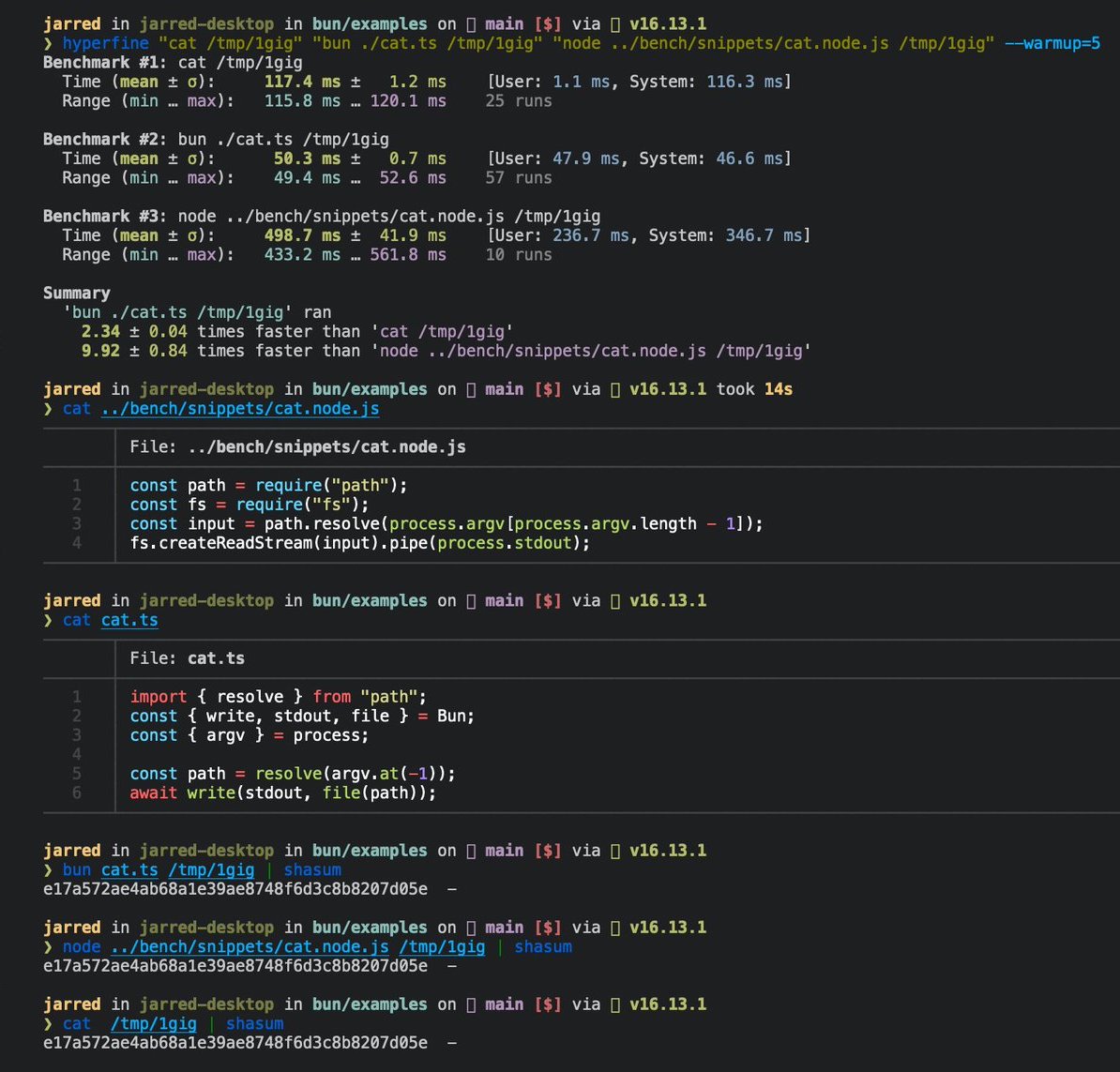
The following is a 3-line implementation of the Linux cat command.
// Usage
// bun ./cat.ts ./path-to-file

import { resolve } from "path";

const path = resolve(process.argv.at(-1));
await Bun.write(Bun.stdout, Bun.file(path));
To run the file:
bun ./cat.ts ./path-to-fileIt runs 2x faster than GNU cat for large files on Linux.
Reference#
interface Bun {
  stdin: BunFile;
  stdout: BunFile;
  stderr: BunFile;

  file(path: string | number | URL, options?: { type?: string }): BunFile;

  write(
    destination: string | number | BunFile | URL,
    input: string | Blob | ArrayBuffer | SharedArrayBuffer | TypedArray | Response,
  ): Promise<number>;
}

interface BunFile {
  readonly size: number;
  readonly type: string;

  text(): Promise<string>;
  stream(): ReadableStream;
  arrayBuffer(): Promise<ArrayBuffer>;
  json(): Promise<any>;
  bytes(): Promise<Uint8Array>;
  writer(params?: { highWaterMark?: number }): FileSink;
  exists(): Promise<boolean>;
  delete(): Promise<void>;
}

export interface FileSink {
  write(chunk: string | ArrayBufferView | ArrayBuffer | SharedArrayBuffer): number;
  flush(): number | Promise<number>;
  end(error?: Error): number | Promise<number>;
  start(options?: { highWaterMark?: number }): void;
  ref(): void;
  unref(): void;
}